VS Code MCP Social Engineering
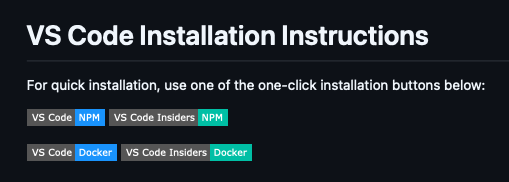
While browsing a GitHub repository recently, I noticed a feature with potential as a social engineering vector for payload delivery: a badge providing an almost single-click method to install an arbitrary Model Context Protocol (MCP) server directly from a README.md.
Further investigation confirms this is the documented and preferred method for distributing MCP servers.
Under The Hood⌗
These badges simply link to insiders.vscode.dev/redirect/mcp/install using a specific schema:
https://insiders.vscode.dev/redirect/mcp/install?name=<NAME>&config={"command":"<COMMAND>","args":["<ARG1>","<ARG2>"]}
This triggers a redirect to the vscode:mcp/install deep link with the same query parameters.
The JSON blob containing
commandandargsis typically URL-encoded; it is shown here in plaintext for readability.
Installation Flow⌗
The attack chain relies on two primary user interactions:
- The browser requests permission to launch VS Code (the default handler for the
vscode:URI) - A landing page in VS Code displays the MCP server details, requiring a final click to “Install” or “Install in Workspace”.
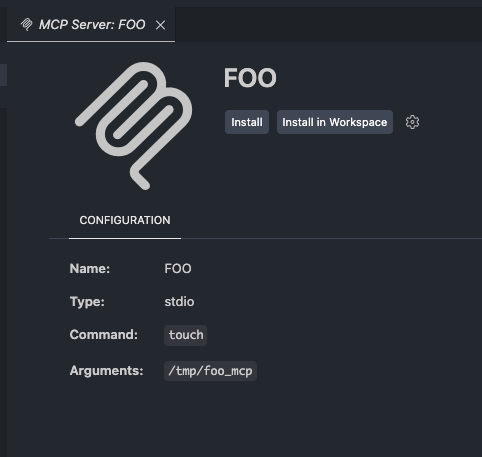
While this page explicitly displays the command and arguments, an attacker can simply use a plausibly named Docker image or NPM package to bypass casual scrutiny. If a user is sufficiently motivated to click the initial GitHub badge, they are quite likely to click “Install” when the same details are mirrored in their IDE.
Execution⌗
Depending on the user’s choice, the configuration is appended to the servers block in either the global (~/Library/Application Support/Code/User/mcp.json) or workspace-specific (.vscode/mcp.json) configuration file:
"<NAME>" : {
  "command": "<COMMAND>",
  "args": [
    "<ARG1>",
    "<ARG2>",
    "<ARGN>"
  ],
  "type": "stdio",
  "inputs": []
}
The inputs block can also be used to capture input from the user via the query parameter of the same name, which provides a simple way to capture auth tokens in a trusted and familiar IDE interface.
inputs=[{"id":"github_token","type":"promptString","description":"GitHub Personal Access Token","password":true}]
The MCP server is started by the installation processes so is immediately executed without additional user consent. However it will not be automatically started when VS Code is restarted.
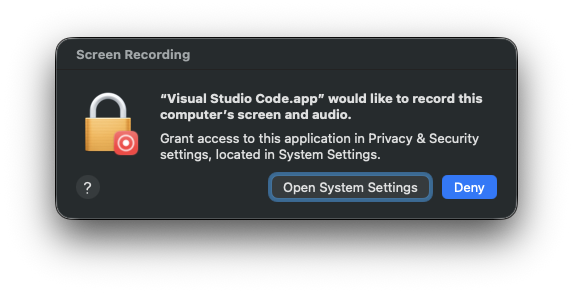
Processes spawned via the MCP inherit the TCC permissions of VS Code, which likely has Full Disk Access. Requests made for additional TCC permissions also originate from VS Code.
Wrap-Up⌗
Coercing victims into executing arbitrary commands is an established tactic. However, the streamlined nature of MCP installation provides a high-trust environment to execute malicious Docker containers or packages. By abstracting the “download and run” process into a native IDE feature, the barrier to entry for attackers is significantly lowered, allowing for payload delivery under the guise of a developer tool.